PC AI KEYBOARD EXPANSION
MaZip PC AI Keyboard
Platform goal: bringing happiness to people and peace to humanity. (Patent applications including No. 10-2025-0198535 and four related applications)
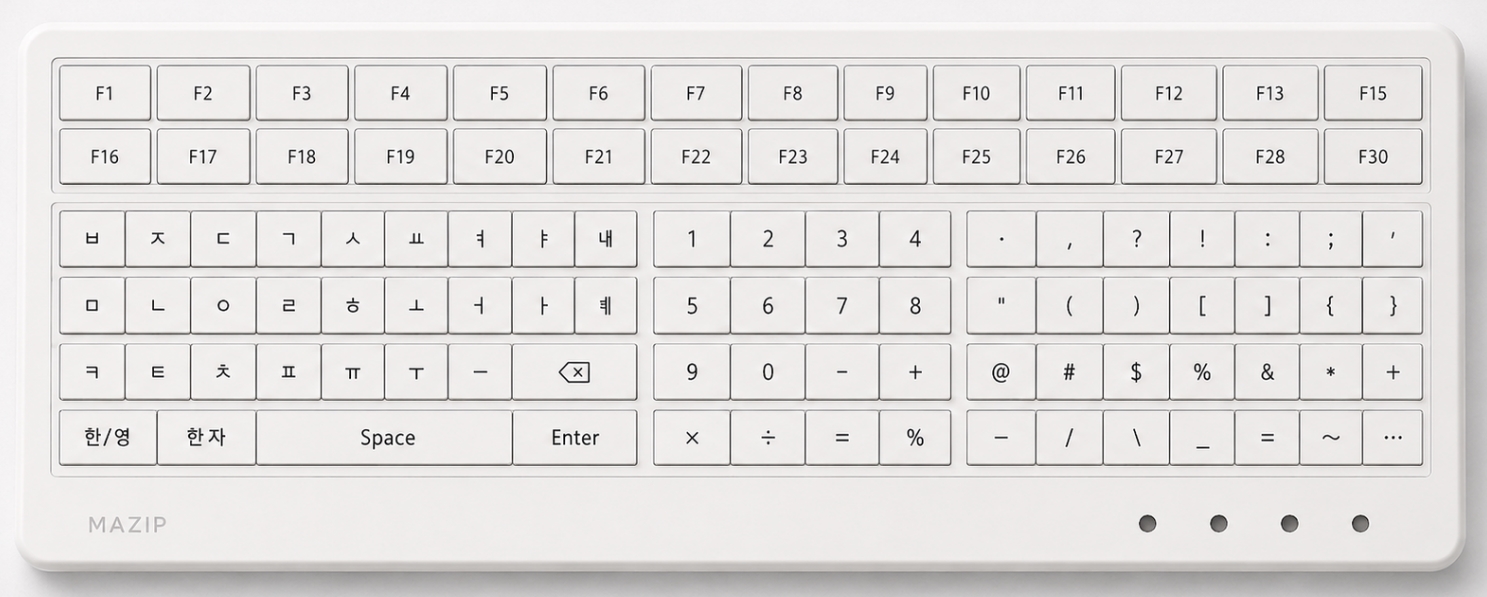
The system combines AI calling, sentence generation, translation, recording, and execution functions while maintaining the physical usability of a real computer keyboard by separating the basic character keys, editing key group, right numeric keypad, and lower AI function row.
PC AI Keyboard View
MaZip AI Keyboard 60-Service Standard Table
This is the MaZip AI Keyboard 60-service standard table. The service types are divided into three categories: AI-use type, account-registration type, and information-registration type, and include 10 USER-customized services.
| No. | Symbol | Code | Service Item | Service Type | Service Overview |
|---|---|---|---|---|---|
| 1 | AI | AI | Instant AI Call | AI Use Type | Calls AI immediately to generate, refine, summarize, or expand an input sentence. |
| 2 | 🎙 | ST | Speech-to-Text Conversion | AI Use Type | Converts speech to text or listens to an audio file and saves it as input text. |
| 3 | 📝 | TR | Record Generation | AI Use Type | Organizes meetings, conversations, consultations, or call contents into a chronological record. |
| 4 | ✍️ | WA | Sentence Writing | AI Use Type | Writes sentences or refines existing sentences. |
| 5 | 📄 | DC | Document Scan | AI Use Type | Recognizes document images, business cards, and similar materials and saves them as text and information. |
| 6 | ⇄ | TL | Translation Execution | AI Use Type | Translates entered sentences or selected content into natural sentences in another language. |
| 7 | 🔊 | IN | Interpretation Execution | AI Use Type | Converts conversation with another person into another language in real time to support communication. |
| 8 | 🔍 | FS | AI Search | AI Use Type | Performs AI search based on a question or input term and compares and organizes the results. |
| 9 | 🖼 | IM | Image Analysis | AI Use Type | Analyzes images and extracts necessary information. |
| 10 | 📊 | DA | Document Analysis | AI Use Type | Analyzes documents and organizes the key contents. |
| 11 | 🧮 | CM | Calculation Execution | AI Use Type | Executes formula input, general calculations, or everyday calculations. |
| 12 | 📚 | ED | Learning Explanation | AI Use Type | Explains learning content. |
| 13 | 💼 | WK | Work Support | AI Use Type | Supports work documents and tasks. |
| 14 | 🍽 | FM | Food Recommendation | AI Use Type | Recommends food choices. |
| 15 | 📧 | EM | Email Writing | Account Registration Type | Registers an email account to write and send messages. |
| 16 | 📣 | SN | SNS Execution | Account Registration Type | Registers an SNS account to post or check content. |
| 17 | 📅 | CA | Schedule Registration | Account Registration Type | Registers a schedule account and saves schedules. |
| 18 | 🏦 | BK | Banking Execution | Account Registration Type | Registers a bank account to execute financial services. |
| 19 | 💳 | PY | Payment Execution | Account Registration Type | Registers a payment account to execute payment services. |
| 20 | 🪪 | ID | Identity Verification | Account Registration Type | Registers authentication information to execute identity verification. |
| 21 | ☁️ | CL | Cloud Storage | Account Registration Type | Registers a cloud account to save files. |
| 22 | 📁 | FL | File Search | Account Registration Type | Finds and opens files or storage locations. |
| 23 | ⬇️ | DL | Download | Account Registration Type | Executes a file download service. |
| 24 | 🖨 | PR | Print Execution | Account Registration Type | Registers printer connection information to execute printing. |
| 25 | 🛡 | SC | Security Check | Account Registration Type | Executes a security service to check status. |
| 26 | 📍 | LP | My Location Sharing | Account Registration Type | Registers or provides location information. |
| 27 | ☀️ | WF | Weather Check | Account Registration Type | Executes a weather service to check current weather. |
| 28 | 🚦 | TF | Traffic Check | Account Registration Type | Executes a traffic information service to check traffic conditions. |
| 29 | 🚌 | BS | Bus Route Check | Account Registration Type | Checks bus route information. |
| 30 | 🚕 | TC | Taxi Call | Account Registration Type | Executes a taxi call service. |
| 31 | ✈️ | TR | Travel Information | Account Registration Type | Connects a travel account or service to check travel information. |
| 32 | 🍜 | RS | Restaurant Search | Account Registration Type | Executes a restaurant search service. |
| 33 | 🏥 | HP | Hospital Search | Account Registration Type | Searches and checks hospital information. |
| 34 | 🛒 | SP | Shopping Search | Account Registration Type | Executes a shopping service to search for products. |
| 35 | 🎟 | CP | Coupon Check | Account Registration Type | Registers a coupon account to check coupons. |
| 36 | 🎵 | MU | Music Execution | Account Registration Type | Registers a music account to execute a music service. |
| 37 | 🍿 | MV | Movie Execution | Account Registration Type | Registers a video account to execute a movie service. |
| 38 | 🥽 | AR | AR Display | Account Registration Type | Executes an AR display service. |
| 39 | 📹 | CC | CCTV Check | Account Registration Type | Registers a CCTV execution path or account to view the screen. |
| 40 | 💡 | HM | Home Device Check | Account Registration Type | Registers a home-device account or execution path to check devices. |
| 41 | 🐾 | PT | Pet Check | Account Registration Type | Registers pet-related devices or information to check status. |
| 42 | 🛠 | AS | After-Sales Service | Account Registration Type | Receives after-sales service requests or connects to customer support. |
| 43 | ☎️ | CT | Contact Search | Information Registration Type | Registers or finds contact information and executes it. |
| 44 | 🗒 | MM | Memo Writing | Information Registration Type | Enters and saves memo contents. |
| 45 | ⏰ | RX | Medication Reminder | Information Registration Type | Registers medication information and provides reminders. |
| 46 | 🧒 | CH | Child Check | Information Registration Type | Registers child protection information to check location or status. |
| 47 | 👵 | EL | Elderly or Vulnerable Person Check | Information Registration Type | Registers care information for elderly or vulnerable persons to check status. |
| 48 | 📡 | LS | Location Sharing | Information Registration Type | Registers sharing target information to share location. |
| 49 | 🚨 | ER | Emergency Call | Information Registration Type | Registers emergency contact information and calls it. |
| 50 | 📌 | EV | Evidence Storage | Information Registration Type | Saves and manages evidence material information. |
| 51 | U1 | U1 | User-Customized Type 1 | Information Registration Type | A service in which the user directly registers an execution path, app, web address, document, contact, or function for use. |
| 52 | U2 | U2 | User-Customized Type 2 | Information Registration Type | A service in which the user directly registers an execution path, app, web address, document, contact, or function for use. |
| 53 | U3 | U3 | User-Customized Type 3 | Information Registration Type | A service in which the user directly registers an execution path, app, web address, document, contact, or function for use. |
| 54 | U4 | U4 | User-Customized Type 4 | Information Registration Type | A service in which the user directly registers an execution path, app, web address, document, contact, or function for use. |
| 55 | U5 | U5 | User-Customized Type 5 | Information Registration Type | A service in which the user directly registers an execution path, app, web address, document, contact, or function for use. |
| 56 | U6 | U6 | User-Customized Type 6 | Information Registration Type | A service in which the user directly registers an execution path, app, web address, document, contact, or function for use. |
| 57 | U7 | U7 | User-Customized Type 7 | Information Registration Type | A service in which the user directly registers an execution path, app, web address, document, contact, or function for use. |
| 58 | U8 | U8 | User-Customized Type 8 | Information Registration Type | A service in which the user directly registers an execution path, app, web address, document, contact, or function for use. |
| 59 | U9 | U9 | User-Customized Type 9 | Information Registration Type | A service in which the user directly registers an execution path, app, web address, document, contact, or function for use. |
| 60 | U0 | U0 | User-Customized Type 10 | Information Registration Type | A service in which the user directly registers an execution path, app, web address, document, contact, or function for use. |
Keyboard Configuration
1. Keyboard Material Configuration
To secure input accuracy, low noise, durability, and manufacturing economy, the input board is configured as a laminated structure.
| Upper Input Layer | This is the part directly touched by the user's finger. It is formed from elastic synthetic resin such as silicone, TPU, or TPE, and each key position includes a convex dome-shaped elastic structure. |
|---|---|
| Touch Sensor Layer | This layer detects the user's touch position and signal changes caused by contact. When the dome is pressed, the distance from the sensor layer and the contact area change, producing an electrical signal variation. |
| Optional Pressure Sensor Layer | It may be omitted in low-cost models and added in premium models. When added, touch position, contact time, and input pressure can be comprehensively determined. |
| Circuit Layer | This layer is configured with PCB or FPCB. It collects signals generated from the touch sensor layer or pressure sensor layer and transfers them to the controller to determine whether the input is valid. |
| Support Layer | This base layer maintains the strength and flatness of the entire keyboard. Aluminum, SUS, or reinforced plastic may be used. |
| External Housing | The material may be selected from ABS, PC, or aluminum depending on the product grade. The surface may be treated by matte coating, UV printing, laser engraving, or silk-screen printing. |
2. Input Determination Configuration
The system does not recognize input merely from simple contact, and applies an input determination structure that distinguishes intentional input from unintentional contact.
| Basic Input Determination | When the user presses a key, the dome of the upper input layer deforms. The resulting electrical signal variation is compared with a reference value, and only signals meeting or exceeding the reference value are determined as valid input. |
|---|---|
| Mistouch Prevention | Brushes, minor contacts, and light finger touches are treated as invalid inputs when below the reference value, thereby reducing mistouches common in flat touch systems. |
| Short Press | Each function key performs a single-touch input as its basic action. For example, the AI key may be used for basic generation, and the TRANS key may be used for input language switching. |
| Long Press | Continuous input for a predetermined time or longer is distinguished as a separate function. For example, the AI key may be used for sentence refinement or expansion, and the TRANS key may be used for full sentence translation. |
| User-Adaptive Sensitivity | The reference value is not fixed and may be adjusted to the user's input pattern based on signal variation, rate of change, contact time, input success, and related factors. |
| Separation of AI Function Keys | AI keys, execution keys, translation keys, voice input keys, recording keys, and user-customized keys are determined as function inputs separate from ordinary character input. AI functions operate only when the user selects an AI execution key. |
Dome Deformation
Signal Variation Occurs
Reference Value Comparison
Valid Input Determination
AI or Basic Input Execution